
If you have a failed HDD and need some guidance on swapping in a replacement, you can use the instructions/video below.
Video
Note: This video is for a Dell PowerEdge R420, but it shoulds still give you a good representation of how to do this task.
Instructions
Replacing a hard drive on a Dell PowerEdge is typically a hot-swap procedure:
- Identify the failed drive, press the release button on the carrier.
- Slide out the old drive.
- If reusing the carrier, swap your replacement HDD in.
- Insert the new drive.
- The RAID controller automatically begins rebuilding the data.
Pre-removal Instructions:
Before you remove the hard drive, do the following:
- Remove the front bezel if installed
Physical disk removal from server and carrier
- Press the release button to open the hard drive carrier release handle.
- Slide the hard drive carrier out until it is free of the hard drive slot.
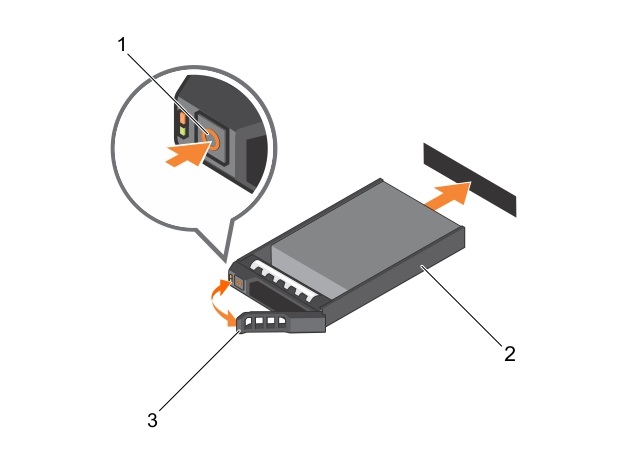
Figure 1
| Item | Description |
| 1 | Release Button |
| 2 | Hard Drive Carrier |
If you need to reuse the carrier:
- Remove the screws from the slide rails on the hard drive carrier.
- Lift the hard drive out of the hard drive carrier.
- If you are not replacing the hard drive immediately, insert a hard drive blank in the empty hard drive slot.
- Insert the replacement hard drive into the hard drive carrier with the connector end of the hard drive toward the back.
- Align the screw holes on the hard drive with the set of screw holes on the hard drive carrier.
- When aligned correctly, the back of the hard drive is flush with the back of the hard drive carrier.
- Attach the screws to secure the hard drive to the hard drive carrier.

Figure 2.
| Item | Description |
| 1 | Screw |
| 2 | Hard Drive |
| 3 | Hard Drive Carrier |
Insert the New Drive
- Insert the hard drive carrier into the hard drive slot until the disk connects with the backplane.
- Close the hard drive carrier handle to lock the hard drive in place.
Note: When a replacement hard drive is installed, it automatically begins to rebuild. Ensure that the replacement hard drive is blank.
Note: Disk rebuild time depends on the size of the array that the disk is part of.
Comments
0 comments
Please sign in to leave a comment.